
Description
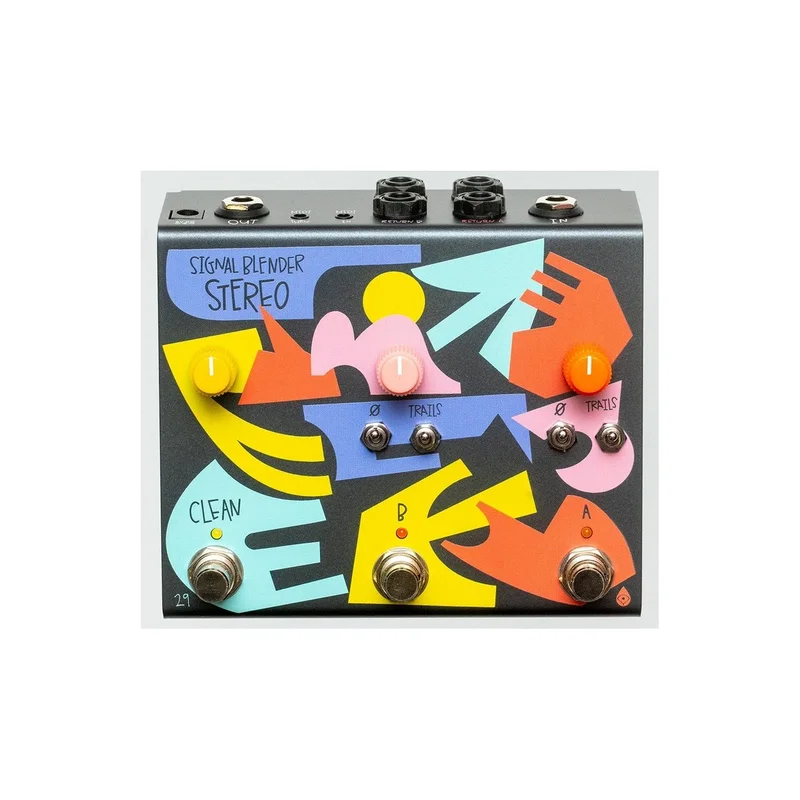
• Mono or Stereo Parallel Effects Chain creator
• Designed in collaboration with 29 Pedals
• Stereo input and output, with two Stereo Effect Loops
• Option for Mono-to-Stereo splitting at the main input
• Individual volume knobs and footswitches for Loop A, Loop B and Clean Signal
• Trails switching for Loop A and Loop B
• MIDI control of on/off and trails switches
• Options for True Bypass when all switches are off
• Top-mounted jacks and Soft-Touch Switching
• Hand-made in Oklahoma, USA
• Powered by (opt.) 9 V DC PSU, scaled up to 15V internally
Signal Blender Stereo is a comprehensive mono or stereo parallel effects chain creator. From the input, your signal forks out into multiple paths, allowing parallel blending of two effects loops (A and B) and the original input (Clean) at the output. Experience the joys of parallel routing, or expand to other use cases, like splitting a signal to three separate outputs, or combining three unique signals into one output. The simple, yet fully featured control set allows for grab-and-go utilitarianism.
The A and B switches engage their relevant effects loop. Tap it to latch the on/off state, or hold it for momentary action. Signal is sent at full strength through the Send jack and the volume knob determines the amount of signal coming back into Signal Blender Stereo via the Return jack. The phase invert toggle allows phase inversion on the return when the toggle is in the up position, accounting for pedals that flip the phase. The trails toggle in the up position prevents the Return from switching off, allowing time-based effects to trail after the footswitch is switched off. In the down position, the send and return are switched on and off together.
The Clean footswitch determines whether the original clean input signal is sent to the main output and the Clean volume knob determines the volume of that signal when engaged.
By default, Signal Blender is designed to be stereo through the use of TRS cables, or mono through the use of TS cables, without the need to change any settings at all on the device. However, if mono input to stereo output is desired, just use the internal dipswitch to assign mono-in-stereo-out (“MISO”), then use a TS cable at the input and TRS cables everywhere else.
MANUAL

Reviews
There are no reviews yet.